PS3 Friendly Arabic Subs Converter
SONY, the well-known entertainment Japanese company, made the PS3 with a unique motto, IT JUST DOES EVERYTHING, anyway, that doesn't include supporting .srt subtitles nor properly viewing Arabic subtitles , when PS3 was jail-broken , developers got the opportunity to make 3rd party apps taking advantage of the ps3 amazing hardware features, free of the restriction SONY used to implement.
I have been using ps3showtime on PS3 for a while , it's a great app , Andreas is doing a great job and we are truly grateful .
as you know , PS3showtime doesn't support Arabic language at all, ps3showtime supports utf-8 encoding but no support for R2L languages or displaying Arabic words in proper form (they are reversed , Arabic letters not connected) ,,
Multiman developer gave a tip, that with replacing the font ps3showtime uses,it would be possible to display Arabic letters properly,, i replaced the font with Microsoft Tahoma which contains all Arabic glyphs,
i wrote a Perl script,to reverse the words , and retype letters in ps3-readable form, and i tried some subtitle files i made on ps3showtime, and they works just fine =)
here i will give screen shots of the subtitle before using the script and after
there are minor bugs need to be sorted out , but for the time being I'm more than satisfied =) ,
BEFORE:
SONY, the well-known entertainment Japanese company, made the PS3 with a unique motto, IT JUST DOES EVERYTHING, anyway, that doesn't include supporting .srt subtitles nor properly viewing Arabic subtitles , when PS3 was jail-broken , developers got the opportunity to make 3rd party apps taking advantage of the ps3 amazing hardware features, free of the restriction SONY used to implement.
I have been using ps3showtime on PS3 for a while , it's a great app , Andreas is doing a great job and we are truly grateful .
as you know , PS3showtime doesn't support Arabic language at all, ps3showtime supports utf-8 encoding but no support for R2L languages or displaying Arabic words in proper form (they are reversed , Arabic letters not connected) ,,
Multiman developer gave a tip, that with replacing the font ps3showtime uses,it would be possible to display Arabic letters properly,, i replaced the font with Microsoft Tahoma which contains all Arabic glyphs,
i wrote a Perl script,to reverse the words , and retype letters in ps3-readable form, and i tried some subtitle files i made on ps3showtime, and they works just fine =)
here i will give screen shots of the subtitle before using the script and after
there are minor bugs need to be sorted out , but for the time being I'm more than satisfied =) ,
BEFORE:
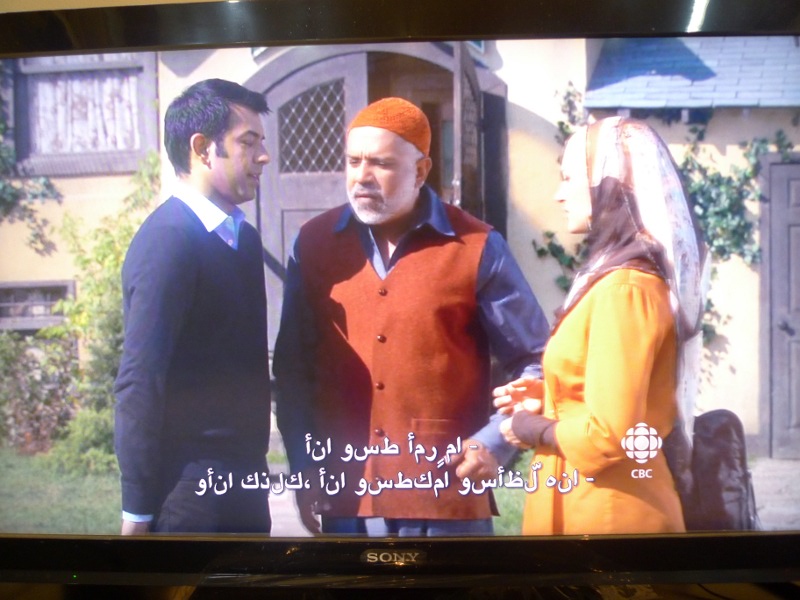
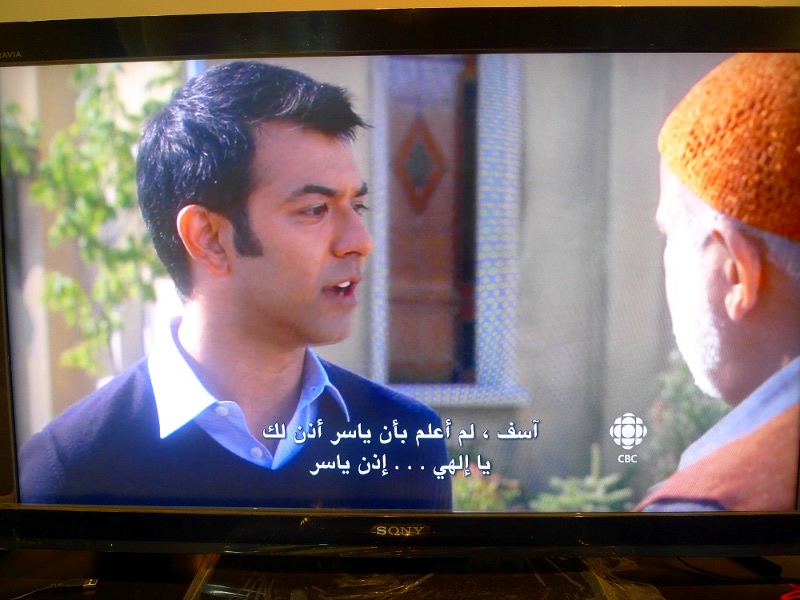
how to use the script:+ the script now
takes subtitles encoded in windows 1256(cp-1256) format as inpu no need for converting them to utf-8
once the srt file is ready, use the provided perl script in the attachments
perl ps3_friendly_arabic_subs_converter.pl subtitle_file.srt;
the script will save the output to new file called subtitle_file_ps3.srt
now open the files using any subtitle editor app to make sure they are well formatted and valid, re-save the file .
now you can enjoy watching your media files with proper Arabic subtitles using ps3showtime
==========
in the attachments you can find the script along with 2 srt smaple files to so you can try them on your PS3
=========
Update 4 Monday, July 18, 2012
+ the script now takes subtitles encoded in windows 1256(cp-1256) format as input, no need to convert them to utf-8
Update 4 Monday, July 16, 2012
+ i received a notice about a bug in the script,due to lack of support for some special Latin characters such as trademark sign , the result text will be malformed and won't be displayed at all on PS3 showtime, so , i added a regex line to omit these characters
+ some subtitles has font tags, alignment ,etc (<i>,<font>) ,,, these are not supported on ps3showtime, the script removes them too.
UPDATE 3 (23-2-2012)
after receiving some feedback about lack of support for some Farsi Alphabet, I added support for most-commonly-used Farsi letters ( ک گ پ ژ چ) , so it's possible now to use the script on Farsi subtitles as well .
you can find a sample in the attachment
Update 2 (16-2-2012) , i tested the script on windows 7 x64bit , perl 5 , and it seems the output of the script is not in the right encoded form
example :
1
00:00:01,539 --> 00:00:03,596
" ﺯïºïº®ïº—ïºŽï»œï»Ÿïº ï»²ï»“ ﺎﻘﺑﺎﺳ . . . "
While it should be like this:
1
00:00:01,539 --> 00:00:03,596
" ﺯﺍﺮﺗﺎﻜﻟﺁ ﻲﻓ ﺎﻘﺑﺎﺳ . . . " The problem has to do with the operating system , not Perl, windows doesn't use utf-8, i will try to modify the code , but for the time being ,to fix this problem , open the ps3_new.srt file with notepad++ (freeware) , then choose Encoding->encode in UTF-8 and re-save it.UPDATE 1: i did some modifications to the code , Hamza at the end of the word proceeded by Ya'a is properly handled (شيء), in the future i will add special characters like
ﻷ etc,
Attachments:
