Thursday, February 2, 2012

How to convert Arabic .srt subtitle to PSG (.Sup) using tsMuxeR ?


I have been experimenting lately with tsmuxer (linux version) to convert some mkv files into ts streams, to watch them on PS3, Thankfully, Crank at Archlinux provided a GUI for the tool which makes the process easy even for newbies.
Tsmuxer capable of outputing the file into AVCHD, Bluray structure or directly Ts stream.
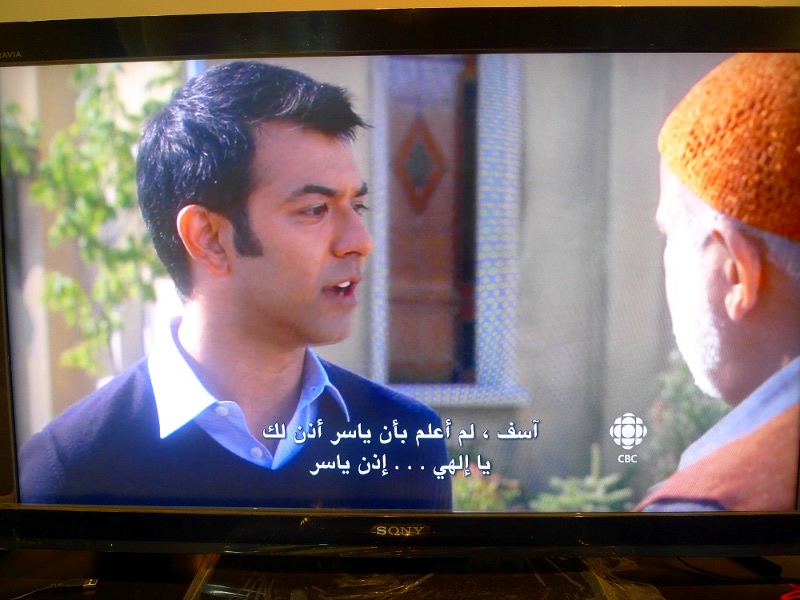
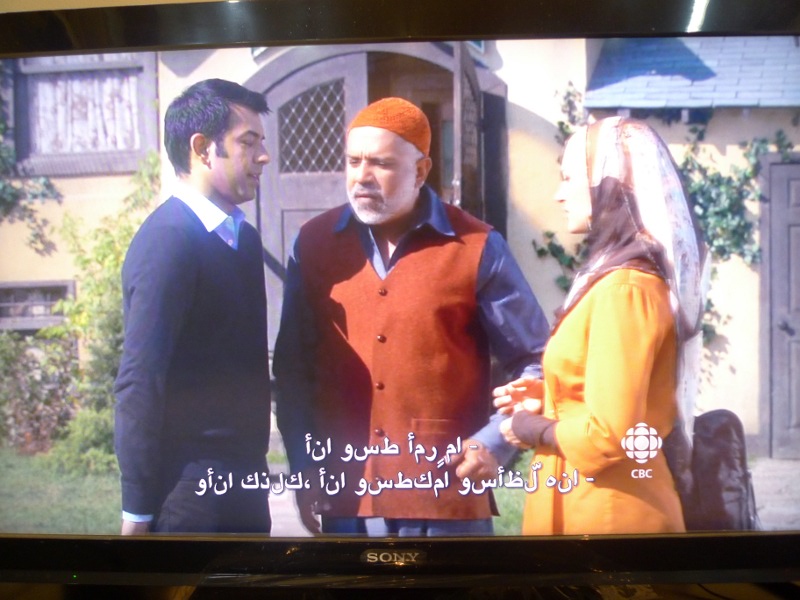
one of the features less mentioned on the technical forums , is abiltiy to convert .srt subs PSG ( the format used in bluray disks, similar to IDX on DVDs), unfortunately no Support for Arabic subtitles, (words reversed, letters disconnected, same result we had back then on Ps3Showtime, so I asked myself why not try to modify the Arabic subtitles with the same tool used to render the Arabic subs into readable form on Ps3SHowtime? to my surprise , it worked like charm, finally, we had proper Arabic PSG subs , compatible with Ts streams (mkv containers as well) and ready to burned on bluray movies, one more thing, we can convert this PSG subtitle into IDX or XML using java-based BdSup2sub tool programmed by e[as far as i know , no such way was available on linux to do so]
========
here is a short How-to Guide:
1-refer to this page to convert the Arabic subtitles into ps3showtime compatilbe , readable subtitle.
2- then TsMuxeR to mux all streams into Ts file, actually we do this to convert .srt to .sup subtitles ,

3- once this is done,we demux the Ts file we made with tsumuxer again, the output is basically all the streams we used first to produce the Ts file plus .Sup subtitles
4-if all you need Sup subtitles, the job is done, but if you want to convert it further into IDX or xml png , use java-based tool, BDSup2Sub, to do so.
now you can Enjoy your Bluray Movie with Arabic subtitles


if you have troube running TsmuxeR gui, you can use this Meta File after you modify it according to your streams (notice , this meta requires tsMuxer tool)


MUXOPT --no-pcr-on-video-pid --new-audio-pes --vbr --vbv-len=500
V_MPEG4/ISO/AVC, "little.mosque.on.the.prairie.s05e01.720p.hdtv.x264-aero.mkv", fps=23.976, insertSEI, contSPS, track=1, lang=eng
A_AC3, "little.mosque.on.the.prairie.s05e01.720p.hdtv.x264-aero.mkv", track=2, lang=eng
S_TEXT/UTF8, "little.mosque.on.the.prairie.s05e01.720p.hdtv.x264-aero.mkv",font-name="Arial",font-size=65,font-color=0x00ffffff,bottom-offset=24,font-border=2,text-align=center,video-width=1280,video-height=720,fps=23.976, track=3, lang=und
S_TEXT/UTF8, "Little.Mosque.on.the.Prairie.S05E01.HDTV.XviD-2HD2.srt",font-name="Arial",font-size=65,font-color=0x00ffffff,bottom-offset=24,font-border=2,text-align=center,video-width=1280,video-height=720,fps=23.976, lang=ara

Thursday, January 26, 2012

PS3 Friendly Arabic Subs Converter

PS3 Friendly Arabic Subs Converter

SONY, the well-known entertainment  Japanese company, made the PS3 with a unique motto, IT JUST DOES EVERYTHING, anyway, that doesn't include supporting .srt subtitles nor properly viewing Arabic subtitles , when PS3 was jail-broken , developers got the opportunity to make 3rd party apps taking advantage of the ps3 amazing hardware features, free of the restriction SONY used to implement.

I have been using ps3showtime on PS3 for a while , it's a great app , Andreas is doing a great job and we are truly grateful .

as you know , PS3showtime doesn't support Arabic language at all, ps3showtime supports utf-8 encoding but no support for R2L languages or displaying Arabic words in proper form (they are reversed , Arabic letters not connected) ,,

Multiman developer gave a tip, that with replacing the font ps3showtime uses,it would be possible to display Arabic letters properly,, i replaced the font with Microsoft Tahoma which contains all Arabic glyphs,

i wrote a Perl script,to  reverse the words , and retype letters in ps3-readable form, and i tried some subtitle files i made on ps3showtime, and they works just fine =)

here i will give screen shots of the subtitle before using the script and after

there are minor bugs need to be sorted out , but for the time being I'm more than satisfied =) ,

BEFORE:


how to use the script:+ the script now

takes subtitles encoded in windows 1256(cp-1256) format as inpu no need for converting them to utf-8

once the srt file is ready, use the provided perl script in the attachments

perl ps3_friendly_arabic_subs_converter.pl subtitle_file.srt;

the script will save the output to new file called subtitle_file_ps3.srt

now open the files using any subtitle editor app to make sure they are well formatted and valid, re-save the file .

now you can enjoy watching your media files with proper Arabic subtitles using ps3showtime

==========

in the attachments you can find the script along with 2 srt smaple files to so you can try them on your PS3

=========

Update 4 ‎Monday, ‎July ‎18, ‎2012


+ the script now takes subtitles encoded in windows 1256(cp-1256) format as input, no need to convert them to utf-8

Update 4 ‎Monday, ‎July ‎16, ‎2012


+ i received a notice about a bug in the script,due to lack of support for some special Latin characters such as trademark sign , the result text will be malformed and won't be displayed at all on PS3 showtime, so , i added a regex line to omit these characters

+ some subtitles has font tags, alignment ,etc (<i>,<font>)  ,,, these are not supported on ps3showtime, the script removes them too.

UPDATE 3 (23-2-2012)


after receiving some feedback about lack of support for some Farsi Alphabet, I added support for most-commonly-used Farsi letters ( ک گ پ ژ چ) , so it's possible now to use the script on Farsi subtitles as well .

you can find a sample in the attachment

Update 2 (16-2-2012) , i tested the script on windows 7 x64bit , perl 5 , and it seems the output of the script is not in the right encoded form

example :

1

00:00:01,539 --> 00:00:03,596

" ﺯﺍﺮﺗﺎﻜﻟﺁ ﻲﻓ ﺎﻘﺑﺎﺳ . . . "

While it should be like this:

1

00:00:01,539 --> 00:00:03,596

" ﺯﺍﺮﺗﺎﻜﻟﺁ ﻲﻓ ﺎﻘﺑﺎﺳ . . . " The problem has to do with the operating system , not Perl, windows doesn't use utf-8, i will try to modify the code , but for the time being ,to fix this problem , open the ps3_new.srt file with notepad++ (freeware) , then choose Encoding->encode in UTF-8 and re-save it.UPDATE 1: i did some modifications to the code , Hamza at the end of the word proceeded by Ya'a is properly handled (شيء), in the future i will add special characters like

ﻷ etc,

Attachments: